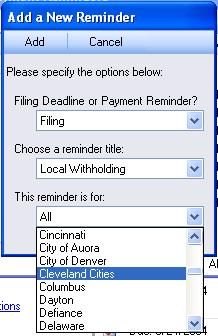
After installing the Greenshades Filing and Payment Center, you may wish to add additional reminders for tasks that you perform throughout the year. To begin, click on the 'Edit Reminders' link to bring up a listing of all the reminders currently on your system. Then, press the 'New' button to launch the 'Add a New Reminder' screen.
Adding a new reminder is fairly straigthforward. Simply specify whether it's a filing or payment deadline, choose the exact deadline that you're adding, and select the agency to which the reminders should apply. You may usually choose 'All' for the filing agency if you are unsure or if you do not wish to have separate reminders for each state/locality in which you employ workers.
Once done, press the 'Add' button. The deadline will be added with default options and recurrence. You will immediately be taken to the Edit Reminder screen where you may edit the options and set up a proper recurrence. If you save your changes then the Greenshades Center will automatically start displaying your new reminder in its reminders list. You may use the Edit Reminders link at any future time to disable or delete your reminder.
For more information on editing reminders, please see the Help Article on Editing a Reminder.